Have you ever looked at a time card and seen something like 8:15 or 7:45 and thought, "How does this turn into payroll totals?" Most payroll systems don’t work with hours and minutes. They use decimal hours instead. That means those time entries need to be converted before calculating wages.
This guide will show you how to manually convert time card entries into decimal hours. You’ll learn an easy formula, follow step-by-step examples, and see how those decimals make it simpler to total up employee hours for payroll.
Table of Contents
- The Simple Formula for Converting Minutes to Decimal Hours
- The Basic Conversion Formula
- Why 60 Minutes Is the Key to the Conversion
- Step-by-Step: Converting Minutes Into Decimal Time
- Example 1: Converting 15 Minutes
- Example 2: Converting 30 Minutes
- Example 3: Converting 45 Minutes
- Common Minute-to-Decimal Conversions
- How to Convert a Full Time Card Entry
- Example: 8 Hours 15 Minutes
- Example: 7 Hours 30 Minutes
- Example: 6 Hours 45 Minutes
- Adding Decimal Hours for Payroll Totals
- When Manual Decimal Conversion Becomes Difficult
- Frequently Asked Questions
- Conclusion
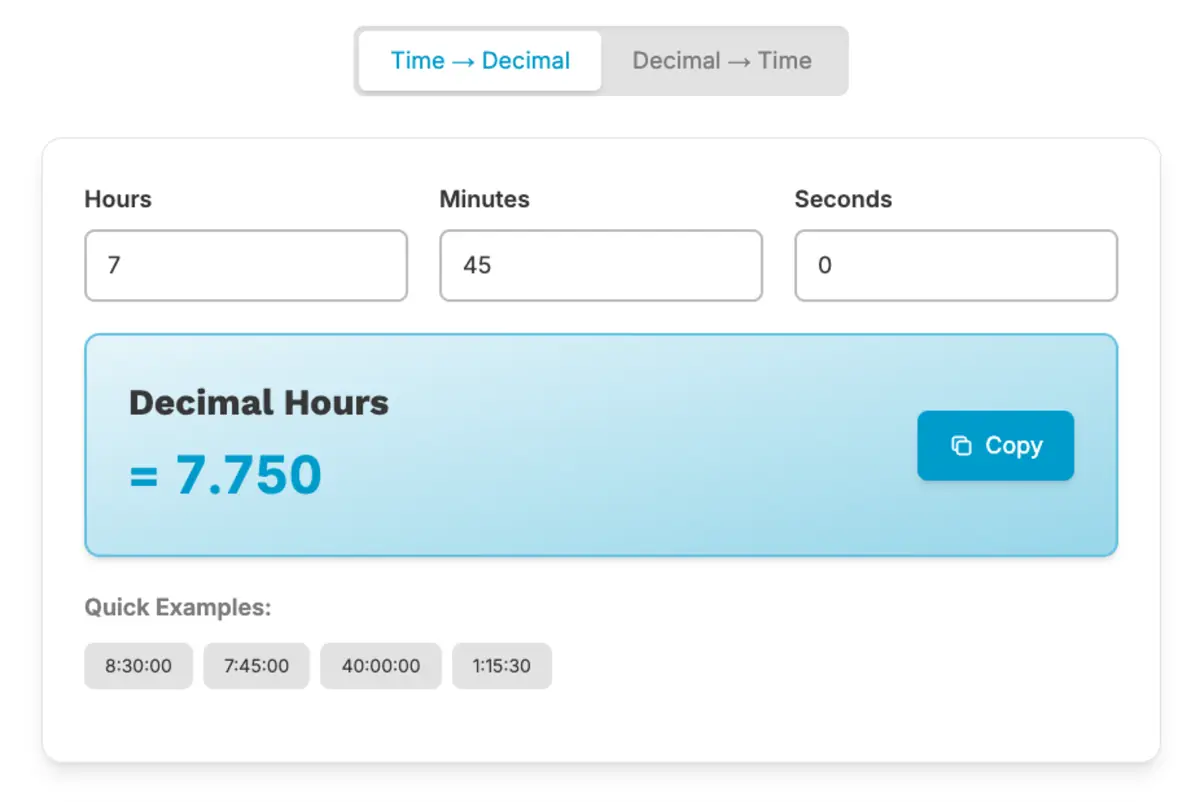
The Simple Formula for Converting Minutes to Decimal Hours
Converting minutes to decimal hours is easier than it sounds. Since one hour has 60 minutes, all you’re doing is figuring out what fraction of 60 those minutes represent.
The Basic Conversion Formula
Here’s the formula you’ll use to make the conversion:
Minutes ÷ 60 = Decimal value
Once you’ve got the decimal value, just add it to the hour portion of the shift.
For example, let’s say someone worked 8 hours and 30 minutes:
30 ÷ 60 = 0.50
8 + 0.50 = 8.50 hours
Why 60 Minutes Is the Key to the Conversion
The reason 60 is so important is simple: every hour is made up of 60 minutes. When you convert minutes to decimal hours, you’re just figuring out what part of that hour was worked.
Here’s how it breaks down:
- 15 minutes is one quarter of an hour
- 30 minutes is half an hour
- 45 minutes is three quarters of an hour
In decimal format, those become 0.25, 0.50, and 0.75.

Want to know why decimals are the go-to for payroll? This article explains how they keep calculations consistent. How Decimal Hours Improve Payroll Accuracy
Step-by-Step: Converting Minutes Into Decimal Time
Let’s break this down with a few easy examples. The steps are always the same: divide the minutes by 60, then add that decimal to the hours worked.
Example 1: Converting 15 Minutes
Step 1: Divide the minutes by 60.
15 ÷ 60 = 0.25
Step 2: Add the decimal to the hours worked.
If the shift was 6 hours and 15 minutes:
6 + 0.25 = 6.25 hours
Example 2: Converting 30 Minutes
Step 1: Divide the minutes by 60.
30 ÷ 60 = 0.50
Step 2: Add the decimal to the hours worked.
If the shift was 7 hours and 30 minutes:
7 + 0.50 = 7.50 hours
Example 3: Converting 45 Minutes
Step 1: Divide the minutes by 60.
45 ÷ 60 = 0.75
Step 2: Add the decimal to the hours worked.
If the shift was 8 hours and 45 minutes:
8 + 0.75 = 8.75 hours
Common Minute-to-Decimal Conversions
When it comes to payroll, you’ll often see the same minute values pop up repeatedly. To save time, here’s a quick reference table with some of the most common conversions.
| Minutes Worked | Decimal Value |
|---|---|
| 5 minutes | 0.08 |
| 10 minutes | 0.17 |
| 15 minutes | 0.25 |
| 20 minutes | 0.33 |
| 30 minutes | 0.50 |
| 45 minutes | 0.75 |
| 50 minutes | 0.83 |
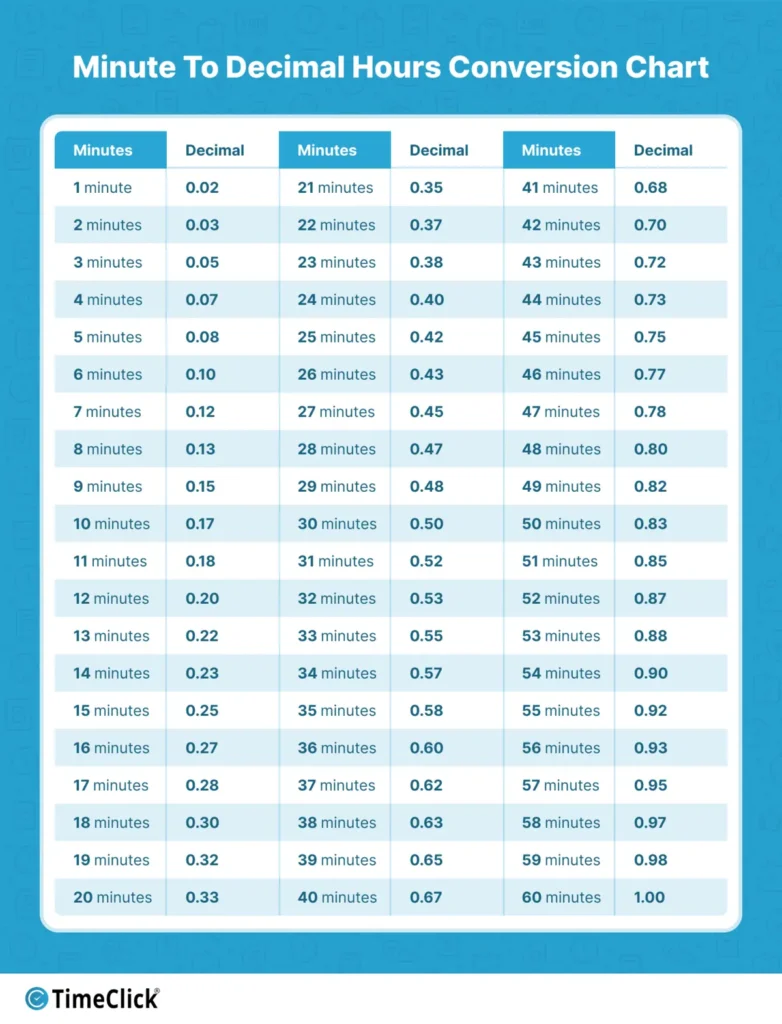
If you ever need the full breakdown, the chart below shows the decimal conversion for every minute from 1 to 60. This can be helpful when reviewing time cards or double-checking payroll math without having to run the formula each time.
How to Convert a Full Time Card Entry
Most time cards include both hours and minutes. To convert the entire entry into decimal hours, just follow two simple steps: convert the minutes first, then add that decimal to the hours worked.
Example: 8 Hours 15 Minutes
Step 1: Convert the minutes.
15 ÷ 60 = 0.25
Step 2: Add the decimal to the hours.
8 + 0.25 = 8.25 hours
Example: 7 Hours 30 Minutes
Step 1: Convert the minutes.
30 ÷ 60 = 0.50
Step 2: Add the decimal to the hours worked.
7 + 0.50 = 7.50 hours
Example: 6 Hours 45 Minutes
Step 1: Convert the minutes.
45 ÷ 60 = 0.75
Step 2: Add the decimal to the hours.
6 + 0.75 = 6.75 hours
Adding Decimal Hours for Payroll Totals
Once you’ve converted all the time card entries into decimal format, adding up payroll totals gets a whole lot easier. Instead of juggling hours and minutes separately, you can just add the decimal values together like regular numbers.
Here’s an example. Let’s say an employee worked these shifts during the week:
- Monday: 8.50 hours
- Tuesday: 7.75 hours
- Wednesday: 8.25 hours
- Thursday: 8.00 hours
- Friday: 7.50 hours
To calculate the total hours for the week, simply add them up:
8.50 + 7.75 + 8.25 + 8.00 + 7.50 = 40.00 hours
This is why payroll systems love decimal hours. Once everything’s converted, adding up work hours is quick and straightforward.
If you’re doing manual conversions, it’s helpful to know the common mistakes businesses make. Check out this guide to avoid them. Common Decimal Time Conversion Mistakes to Avoid
When Manual Decimal Conversion Becomes Difficult

For smaller teams, manually converting time cards into decimal hours is usually pretty manageable. It’s just basic division and addition.
But as your team grows or schedules get more complicated, these conversions can pile up fast. When you’re doing this hundreds of times each pay period, it might be time to look for tools that simplify the process and ensure consistency.
That said, understanding how the math works is still super valuable. Once you know the basics of decimal conversion, it’s much easier to double-check time totals and make sure payroll numbers are accurate.
Frequently Asked Questions
Converting time cards into decimal hours is a common part of payroll, but it’s normal to have questions about how it all works. These quick answers clear up some of the most common points of confusion when turning hours and minutes into decimals.
How do you convert minutes into decimal hours?
To convert minutes into decimal hours, just divide the number of minutes by 60. This tells you what fraction of an hour those minutes represent. For example, 30 minutes divided by 60 equals 0.50, which is half an hour in decimal form.
What is 15 minutes in decimal hours?
15 minutes equals 0.25 hours in decimal form. You get this by dividing 15 by 60. Since 15 minutes is one quarter of an hour, the decimal equivalent is 0.25.
What is 45 minutes in decimal time?
45 minutes converts to 0.75 hours. Divide 45 by 60 to get the decimal value. Since 45 minutes is three quarters of an hour, the decimal result is 0.75.
Why do payroll calculations use decimal hours?
Decimal hours make it much easier to add up work hours. Instead of dealing with hours and minutes separately, you can simply add the decimal values together for quick and accurate payroll totals.
How do you convert 8 hours and 30 minutes into decimal hours?
Start by converting the minutes into decimals by dividing by 60. In this case, 30 ÷ 60 = 0.50. Then, add that decimal to the hours worked. The total is 8.50 hours.
Conclusion
Converting time cards into decimal hours is simple once you know the formula. By dividing minutes by 60 and adding the result to the hours worked, you can easily turn standard clock time into a format that’s ready for payroll calculations.
Even if you eventually use automated tools to handle the math, understanding how decimal conversion works makes it easier to double-check time records and ensure payroll totals are accurate. With these steps, you can confidently go from time card entries to clean, payroll-ready totals in no time.
Not using TimeClick yet? Try our time clock software free. 10-minute setup, unlimited users, and built for small businesses. No credit card required.
Start your FREE TimeClick Trial Today.