
Payroll prep can be stressful, especially when you’re stuck manually calculating hours and double-checking spreadsheets. Even small discrepancies, like whether someone worked 39.75 or 40.25 hours, can add up over time and create bigger issues.
This guide will show you how tools designed for shift totals, break deductions, and weekly work hours can simplify payroll. Whether you’re managing schedules, running payroll, or reviewing hours, you’ll learn when to move from basic calculators to full time tracking systems and how these tools can fit into your workflow.

If you’re ready to quickly total employee hours, breaks, and weekly totals without the manual math, check out our free time card calculator
Table of Contents
- What a Time Card Calculator Actually Is (In Plain Business Terms)
- Why Businesses Started Using Hour Calculation Tools Instead of Manual Methods
- How a Typical Work Hours Calculator Works Step by Step
- Common Features Most Modern Time Calculation Tools Include
- Time Card Calculators vs Full Time Tracking Software (Important Distinction)
- Who Usually Needs a Time Card Calculator the Most
- Where Businesses Still Run Into Problems Using Basic Hour Calculators
- Manual Entry Errors
- Missing Punches
- Limited Compliance Records
- No Audit Trail
- How to Choose the Right Type of Time Card Calculator for Your Business
- Team Size
- Payroll Complexity
- Compliance Risk Level
- Budget vs Long-Term Cost
- Data Ownership and Offline Use
- Frequently Asked Questions
- Final Thoughts
What a Time Card Calculator Actually Is (In Plain Business Terms)

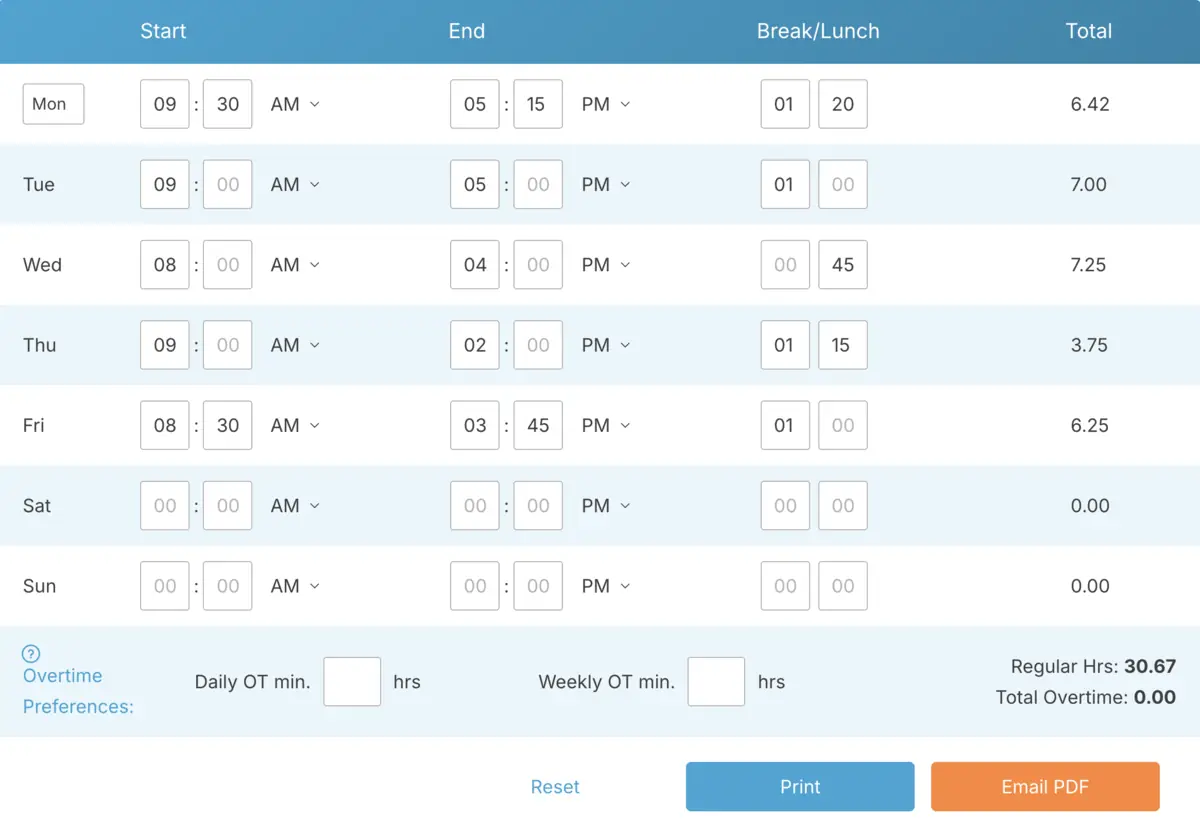
A time card calculator is a simple tool that adds up employee work hours for you. Instead of sitting down with a scratchpad to manually count hours worked each day, you just enter start times, end times, and any break periods. The calculator does the math and gives you a clear total.
Think of it as a digital replacement for the old paper punch card system. Instead of manually totaling time at the end of the week, the tool calculates shift hours instantly and consistently, reducing the chance of math errors or rounding mistakes.
Businesses typically use these tools for payroll prep, reviewing labor costs, or tracking hours for specific jobs. For instance, a manager might use one to double-check weekly totals before running payroll. A project manager could calculate total labor hours for a job. A small office might rely on it to avoid errors in spreadsheets.
The goal is straightforward: take the manual math out of the equation, reduce errors, and ensure the hours going into payroll are accurate. Even small mistakes, like rounding errors or missed break deductions, can cause big headaches when they add up across multiple employees and pay periods.
Why Businesses Started Using Hour Calculation Tools Instead of Manual Methods

Most businesses don’t start off with hour calculation tools. They usually begin with paper timesheets, simple spreadsheets, or even text messages where employees report their hours. That can work for a while, but as the team grows and schedules get more complex, mistakes start creeping in more often.
This is usually the point where business owners realize that doing payroll math manually is taking too much time or creating too much risk.
Here’s why many businesses decide to make the switch:
Payroll accuracy matters: Mistakes in payroll can cost you. Overpaying cuts into your profits, while underpaying can lead to frustration or even legal trouble. When you’re manually adding hours or relying on spreadsheets, it’s easy to miss things like breaks or overtime. Automated tools handle the math for you, so you don’t have to worry about those errors.
Keeping solid records: Employers are legally required to maintain accurate records of hours worked, overtime, and breaks. Even if an audit feels unlikely, inconsistent documentation can become a serious problem if wage disputes arise. A structured calculation tool helps create consistent records that protect both your business and your employees.
Saving time: Manually checking and fixing hours can eat up a huge chunk of your week, especially if you’re managing a larger team or rotating schedules. An hour calculator speeds up the process, giving you more time to focus on other parts of your business.
Fewer pay disputes: Pay disputes are bound to happen, but having clear, consistent hour calculations makes them much easier to resolve. Instead of relying on vague memories, you can point to solid numbers. That kind of transparency takes a lot of the stress out of payroll week.
How a Typical Work Hours Calculator Works Step by Step
Most work hour calculators are designed to be straightforward. While the interface might look a little different depending on the tool, the basic process is usually the same.
You start by entering when the employee began their shift, then when they finished. If there’s an unpaid break, you add that too. The calculator does the math for you, subtracting break time and giving you the total hours worked.
Many tools can also handle weekly totals, pay period summaries, or even overtime calculations, depending on the settings.
Here’s how it typically works:
- Enter the shift start time
- Enter the shift end time
- Add any unpaid break time
- The tool calculates the total hours for that shift
- Daily totals are combined into weekly or pay period totals
The key benefit is consistency. The same inputs produce the same totals every time, which is critical for payroll accuracy and internal review.
Some calculators also convert hours into decimal format automatically, which is helpful since many payroll systems use decimals (like 8.5 hours) instead of hours and minutes (8 hours 30 minutes).
More advanced tools even let you export totals directly into payroll or accounting systems, saving you another step and making the process even smoother.
Common Features Most Modern Time Calculation Tools Include

Not all hour calculation tools are created equal, but most modern options include features designed to standardize payroll calculations and reduce inconsistencies. The goal is predictable, repeatable totals every pay period.
Here are some of the most helpful features you’ll typically find:
Daily hour totals: Most tools automatically calculate each shift’s total once you enter the start time, end time, and any break deductions. This helps you catch issues early before they affect your weekly payroll.
Weekly and pay period totals: Instead of manually adding up each day, the system combines daily totals for you. This is a huge time-saver, especially if you’re managing a larger team or rotating schedules.
Break and lunch deduction logic: Some tools let you set standard break rules, so you don’t have to manually subtract break time for every shift. This keeps calculations consistent across your team.
Overtime detection: Advanced tools can flag when employees hit overtime thresholds based on your payroll rules. This helps you avoid unexpected overtime costs and speeds up payroll reviews.
Decimal hour conversion for payroll systems: Many payroll platforms use decimal formats, like 8.5 hours instead of 8 hours and 30 minutes. These tools handle the conversion automatically, so you don’t have to do extra math before running payroll.
Time Card Calculators vs Full Time Tracking Software (Important Distinction)
A common question business owners have is, “What’s the difference between a basic time card calculator and full time tracking software?” They might seem similar, but they’re designed to solve different problems.
A basic time card calculator helps you figure out totals by entering shift details manually. Full time tracking software, on the other hand, automatically collects time data when employees clock in and out.
| Tool Type | What It Actually Does |
|---|---|
| Basic Hour Calculator | You manually enter shifts, and the tool calculates totals |
| Spreadsheet Templates | You create formulas to total hours, but errors can happen easily |
| Software With Built-In Hour Math | Automatically calculates totals from clock-in and clock-out data |
| Full Time Tracking Platforms | Automatically collects time, stores records, calculates totals, and prepares payroll data |
For small teams, manual tools like calculators or spreadsheets can work just fine. But as your payroll gets more complex, many businesses find it’s worth switching to systems that collect and calculate time automatically, reducing the need for manual entry.
Who Usually Needs a Time Card Calculator the Most

Not every business needs full time tracking software right away. For many, a simple shift total tool is the perfect middle ground between manual tracking and fully automated systems. These tools are especially helpful for businesses that deal with hourly work but aren’t quite ready to invest in a full tracking solution yet.
Here are some real-world examples of who benefits the most:
- A restaurant manager who needs to total hours for a team of servers each week, including part-timers swapping shifts or taking staggered breaks.
- A construction foreman tracking labor costs on a project, quickly adding up crew hours to monitor job budgets before payroll day.
- Small retail shops still running payroll by hand, looking to avoid math errors when inputting hours for cashiers and stockers.
- Cleaning companies with rotating client jobs, using a calculator to ensure each cleaner’s time is tallied correctly before sending out payroll.
- Service-based businesses where teams or technicians work at different client sites and report hours in batches that need to be double-checked.
For small teams handling payroll manually, these tools are often the first step. If you’re entering hours by hand, having a reliable way to total shifts can save you time and reduce mistakes.
Businesses moving away from spreadsheets also tend to adopt these tools early. While spreadsheets can work, they often become error-prone once multiple people start editing them or formulas get too complex.
Even companies with time tracking systems sometimes use calculators as a backup. Running shift totals separately can be a great way to double-check hours before payroll is finalized.
Job-based industries rely on them too. Construction crews, service companies, and project-based teams often need quick shift totals to understand labor costs per job before payroll even starts.
Here are some signs your business could benefit from a time card calculator:
- You spend more than an hour each pay period double-checking hour totals by hand.
- Employees frequently swap shifts, making timesheets harder to track.
- Your business is growing, and spreadsheet errors are becoming a bigger risk.
- You want a simple, reliable way to resolve pay disputes quickly.
Where Businesses Still Run Into Problems Using Basic Hour Calculators

Shift total tools are great for simplifying math, but they don’t solve every time tracking challenge. As businesses grow or payroll becomes more complex, these tools can start to show their limitations.
Manual Entry Errors
If someone enters the wrong start time or forgets to include a break, the tool will calculate the math correctly, but the data itself will still be wrong. These tools rely on accurate information being entered in the first place.
Missing Punches
When employees forget to record their time or submit incomplete details, there’s nothing for the tool to calculate. Managers often have to chase down missing information manually, which can be time-consuming.
Limited Compliance Records
Most basic calculators don’t store long-term records or provide a detailed history of edits. This can become a problem if you need to review past payroll data or explain changes later on.
No Audit Trail
Without a clear record of who made changes or when adjustments were made, it’s harder to track corrections. For growing businesses, this lack of transparency can become a risk.
Because of these differences, choosing the right type of tool becomes an important decision as your business grows.
How to Choose the Right Type of Time Card Calculator for Your Business
Not every business needs the same type of hour calculation tool. The best choice depends on how complex your payroll is, how large your team is, and how much manual work you’re willing to handle each pay period.
Team Size
If you only have a few employees, simple shift total tools can work well. As your team grows, though, manual entry often becomes harder to manage consistently.
Payroll Complexity
If you’re dealing with overtime rules, different pay rates, or multiple job roles, you might need tools that can handle more advanced calculations automatically.
Compliance Risk Level
For industries with strict labor requirements or frequent audits, having consistent and well-documented hour calculations is critical.
Budget vs Long-Term Cost
Some businesses focus on the upfront cost of a tool, while others think about the bigger picture. They consider how much payroll errors, extra admin time, and compliance issues could cost them in the long run. The best choice balances what you spend now with what you’ll save later.
Data Ownership and Offline Use
Some businesses prefer tools that run locally or don’t require internet access, while others are fine with browser-based solutions. Knowing where your data is stored and how you can access it becomes more important as your business grows.
Frequently Asked Questions
Here are answers to some of the most common questions business owners have when comparing shift total tools, payroll calculators, and full time tracking systems.
What’s the difference between a time card calculator and time tracking software?
A time card calculator totals hours after you manually enter them. Time tracking software, on the other hand, automatically records work hours when employees clock in and out, then calculates totals for you in the background.
Are free hour calculation tools accurate enough for payroll?
They can be accurate as long as the data you enter is correct. The biggest risk is human error during manual entry. Many small teams use them successfully, but as businesses grow, they often switch to automated tools to reduce mistakes.
Do time card calculators handle overtime automatically?
Some do. Basic calculators might only total hours, while more advanced ones can calculate overtime based on rules you set. It depends on the specific tool you’re using.
Can I use a work hours calculator for labor law compliance?
A work hours calculator can help ensure accurate hour totals, but most basic tools don’t store detailed records or provide an edit history. If you need reliable compliance records, full time tracking systems are often a better choice.
When should a business stop using spreadsheets for tracking hours?
Most businesses move away from spreadsheets when they start causing errors, take too much time to manage, or become difficult to audit. This often happens as teams grow or payroll rules become more complicated.
Final Thoughts

Hour calculation tools are designed to make payroll simpler and more reliable. For small teams, a basic shift calculator might work just fine. But as payroll becomes more complex, manual entry and scattered records can lead to unnecessary problems.
That’s why many growing businesses move to systems that handle time tracking, record-keeping, and calculations automatically. The right tool depends on your team size, how much risk you’re willing to take, and your long-term goals as a business.
Not using TimeClick yet? Try our time clock software free. Simple setup, unlimited users, and built for small businesses. No credit card required.
Start your FREE TimeClick Trial Today.