Sometimes when you install TimeClick® and try to open it for the first time, you’ll receive an error message that reads, “The program can’t start because F3BIPRCT.dll is missing from your computer. Try reinstalling the program to this problem.”
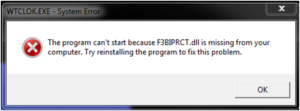
Table of Contents
What is it?
During the download and installation of our software, you receive a series prompts; whether you trust Hawkeye Technology/TimeClick, do you accept the terms, where you would like to install the program, and where you would like to install the database. Among these is one notification that to restart your computer when you’re finished, and another at the very end, asking yes/no if you would like to restart now. Windows recommends restarting your computer after the installation of any new program. Most times the computer will recognize everything right out of the chute and won’t require the restart at all. But since you’re reading this blog, that probably means you are part of the minority.
The solution
This is a Windows error message and despite what it says reinstalling the program will not resolve the issue. Good news though! The solution is about as easy as it gets. All you have to do is perform that restart we referenced. Then TimeClick will be able to “see” the file and open as intended. You don’t even need to do a full restart—you can simply log off the user account and log back in.

Final words
During the TimeClick install, you should see two pop-up messages informing you of a required restart, but let’s face it—once we choose to add a program, we become impatient for our new gadget and all pretty much just click Yes/I Agree/Next/OK a dozen times, missing those messages completely. Fortunately it is an easy fix. You should be able to use TimeClick just a few short minutes from now. If you have additional questions, you are always welcome to contact us by email at support@timeclick.com or by phone at 435.753.4102.
Ready to streamline your employee time tracking, boost productivity, and simplify payroll? Sign up for your FREE 14-day trial today and see how TimeClick can transform your business!
Start your FREE TimeClick Trial Today.