
Payroll errors often start long before they reach the payroll department. Missed break deductions, inconsistent rounding, or manual overtime calculations can seem minor, but over time and across multiple employees, these small issues add up quickly.
The businesses that avoid this cycle don’t just “get better at math.” They build structure into how hours are calculated by applying consistent rules every time. This guide explores where payroll errors usually begin and how disciplined systems can prevent them before they happen.
Table of Contents
- Where Payroll Errors Usually Begin
- Re-entering Hours Between Systems
- Inconsistent Rounding Rules
- Break Deductions Done Differently
- Manual Overtime Calculations
- Editing Time After the Fact Without Records
- The Shift From Calculating Hours to Standardizing Them
- What an Error-Prevention Workflow Looks Like
- 1. Time Is Captured Daily, Not Reconstructed Later
- 2. Break Rules Are Applied Automatically
- 3. Overtime Is Flagged Before Payroll Begins
- 4. Managers Review and Approve Hours in One Place
- 5. Payroll Receives Verified, Payroll-Ready Totals
- 6. Edits Are Logged and Traceable
- How Structured Approval Processes Prevent Payroll Corrections
- Set Clear Review Times
- Use a Standard Approval Checklist
- Separate Time Entry from Final Approval
- Lock Records After Approval
- Keep Detailed Audit Trails
- Manual Hour Totals vs. a Structured Calculation Process
- How Payroll Teams Use Calculators to Reduce Risk and Protect the Business
- Ensuring Accuracy
- Improving Visibility
- Preventing Disputes
- Supporting Budgeting
- Maintaining Compliance
- Frequently Asked Questions
- Final Thoughts
Where Payroll Errors Usually Begin

Payroll mistakes don’t usually happen because someone pressed the wrong button at the last minute. They almost always start earlier in the process, when hours are being recorded, adjusted, or moved between systems.
Here are the most common ways things can go off track.
Re-entering Hours Between Systems
Manual re-entry is one of the biggest trouble spots. Hours might get written down on paper or entered into a spreadsheet, and then someone has to copy those numbers into payroll software. Every time numbers are transferred, there’s a chance for typos, misreads, or accidental overwrites.
Even a tiny typo can mess up an entire paycheck. Multiply that by a whole team, and those small errors can quickly add up to real money.
Inconsistent Rounding Rules
Rounding is another sneaky issue. One manager might round to the nearest five minutes. Another might always round up. Someone else might round down. Over time, these little differences create totals that don’t match across departments.
If there’s no single, consistent rounding rule, payroll ends up with a mix of calculations that don’t add up.
Break Deductions Done Differently
Unpaid lunches and rest breaks are another common sticking point. If break time isn’t deducted the same way every time, total hours can slowly creep up. Some supervisors might automatically subtract breaks, others might rely on employees to enter them manually, and some might forget to deduct them altogether.
When break policies aren’t built into the hour calculation process, payroll has to clean up the mess later, and fixing it after the fact is always harder.
Manual Overtime Calculations
Overtime is where mistakes can get really costly. Weekly hours have to hit certain thresholds, and in some states, daily overtime rules apply too. Trying to calculate all of that manually, especially when pay periods overlap weeks, leaves a lot of room for errors, like missed hours or incorrect rates.
It’s not that payroll teams don’t understand overtime. It’s just that manual math makes it way too easy for mistakes to slip through.
Editing Time After the Fact Without Records
Sometimes, last-minute edits are unavoidable. Maybe someone forgot to clock in, a shift was entered wrong, or a manager had to make an adjustment. The real problem happens when those changes aren’t documented.
If there’s no record of what was changed and why, it’s hard to explain discrepancies later. When an employee questions their paycheck, payroll needs clear documentation, and it’s also required under the Fair Labor Standards Act. Without structured documentation, things can get stressful fast.
None of these issues are dramatic on their own. They’re just small process gaps. But payroll accuracy depends on consistency, and that consistency falls apart when hours are handled differently from one shift to the next.
The Shift From Calculating Hours to Standardizing Them

There’s a big difference between just calculating hours and standardizing how those hours are calculated.
Most businesses focus on “getting the math right.” But payroll teams know that’s only part of the equation. The real goal is to make sure the same rules are followed every single time, no matter who’s entering the data.
When hours are totaled manually, the math might technically be correct, but the process behind it can vary. One supervisor might automatically deduct breaks, while another waits until the end of the week. One person might round before subtracting lunch, and someone else might round after. These little differences add up, and the totals don’t always match.
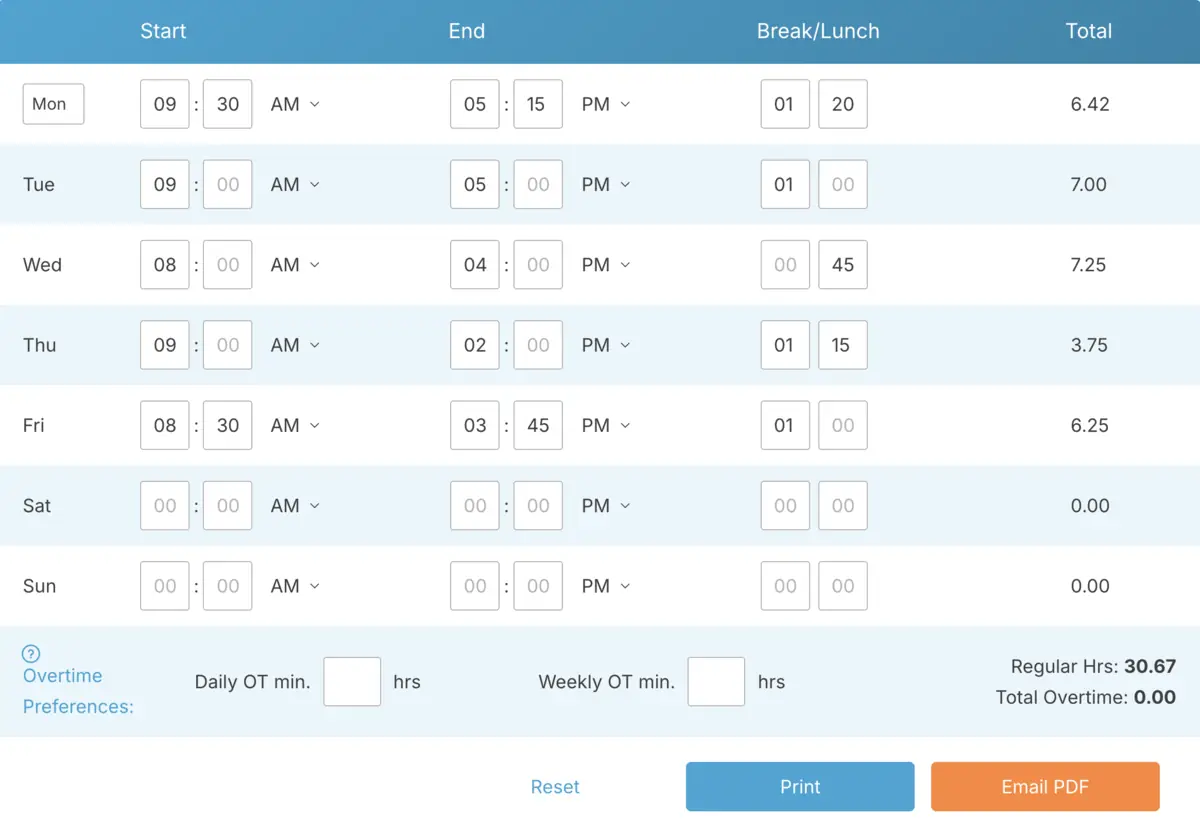
That’s where structured time card calculators come in. Instead of leaving things open to interpretation, they apply consistent rules every time:
- Break deductions follow the same policy for everyone.
- Rounding is done the same way across all shifts.
- Overtime thresholds are flagged automatically.
- Total hours are locked in before they’re sent to payroll.
This kind of consistency takes the guesswork out of the process and makes the numbers predictable, which means fewer corrections later.
Experienced payroll teams rely on a single, centralized record for all time data. Hours are reviewed in one place, adjustments are documented, and once everything is approved, the totals move to payroll in a verified format. The technology supports the process, but it’s the discipline behind the process that keeps errors from spreading.
Making this shift does two big things. First, it cuts down on mistakes. Second, it lowers stress. When hours are standardized early in the process, payroll becomes more about reviewing and less about fixing problems.
What an Error-Prevention Workflow Looks Like
When payroll runs smoothly, it’s usually because the process leading up to it is well-organized. Strong payroll teams don’t wait until the end of the pay period to start checking numbers. Instead, they build checkpoints into the workflow to catch mistakes early.
Here’s how that typically works in practice.
1. Time Is Captured Daily, Not Reconstructed Later
The first step is straightforward: record hours as shifts happen. Employees clock in and out in real time using a structured digital time card system or a simple browser-based tool. This eliminates the need for end-of-week guesswork.
When time is entered immediately, payroll isn’t relying on memory or rough estimates. The data is cleaner and more accurate from the start.
2. Break Rules Are Applied Automatically
Instead of asking supervisors to manually subtract lunch breaks, the system handles it for you. If your policy requires a 30-minute unpaid lunch after a certain number of hours, that rule is built right into the calculation process.
This takes care of one of the most common reasons payroll totals creep up unexpectedly.
3. Overtime Is Flagged Before Payroll Begins
Rather than scrambling to calculate overtime manually at the last minute, structured work hour calculators flag when employees hit daily or weekly overtime thresholds. This gives payroll a chance to review and address any issues before checks are processed.
This step is especially helpful when pay periods overlap weeks or when local labor laws add extra layers of complexity.
4. Managers Review and Approve Hours in One Place
Before payroll even gets involved, managers review and approve hours in the same system where time was recorded. They confirm shifts, make adjustments if needed, and document any changes.
Because everything happens in one centralized system, there’s no confusion over versions or the need to reconcile multiple spreadsheets.
5. Payroll Receives Verified, Payroll-Ready Totals
Once hours are approved, payroll doesn’t have to rebuild anything. They’re simply reviewing totals that have already been standardized. The export includes break deductions, uniform rounding, and clearly flagged overtime.
At this point, payroll becomes more about confirming accuracy than doing calculations from scratch.
6. Edits Are Logged and Traceable
If changes need to be made after approval, they’re fully documented. There’s a clear record of what was changed and why. This protects both the business and the employee if any questions come up later.
When you look at the entire workflow, it’s clear that error prevention isn’t about catching mistakes at the last minute. It’s about creating a process that removes the conditions for mistakes in the first place.
How Structured Approval Processes Prevent Payroll Corrections
Payroll corrections often happen when approvals are treated as a quick formality instead of a meaningful checkpoint. If managers rush through approvals without carefully reviewing break deductions, overtime flags, or recent edits, small mistakes can slip through and turn into paycheck problems later.
A well-structured approval process changes that. By building verification steps into the workflow before payroll even sees the numbers, teams can catch and fix issues early.
Set Clear Review Times
Strong workflows include specific times for reviewing hours. For example, managers might check daily totals at the end of each shift and do a final review at the end of the week. This avoids last-minute, rushed approvals that can miss important details.
When reviews happen consistently, errors are caught while details are still fresh, not days later when memories fade.
Use a Standard Approval Checklist
Approvals should follow a clear checklist, not just a quick glance. Managers should confirm:
- Break deductions follow company policy.
- Rounding rules are applied consistently.
- Overtime totals match daily or weekly thresholds.
- All edits are documented and explained.
When everyone uses the same criteria, approvals become a reliable quality-control step instead of just a rubber stamp.
Separate Time Entry from Final Approval
In a disciplined workflow, the person entering time isn’t always the one giving final approval. Having someone else review the totals adds an extra layer of oversight and makes it less likely that errors will go unnoticed.
This doesn’t have to be complicated. It just ensures that at least one fresh set of eyes checks the numbers before payroll processes them.
Lock Records After Approval
Once hours are approved, they should be locked to prevent last-minute changes that could cause confusion between what managers approved and what payroll processes.
If changes are needed after approval, they should trigger a documented re-approval step. This extra control significantly reduces the chance of post-payroll corrections.
Keep Detailed Audit Trails
Every adjustment should include a record of what changed, who made the change, and why. With a clear audit trail, payroll teams don’t have to piece together events from emails or memory.
This level of documentation protects the business, ensures compliance, and gives payroll confidence that the approved totals are accurate.
When you combine standardized calculations with structured approvals, the difference between a disciplined workflow and a manual one becomes obvious. Seeing the contrast side by side makes it clear where errors are allowed to grow and where they’re prevented.
Manual Hour Totals vs. a Structured Calculation Process
| Process Area | Manual or Spreadsheet Process | Structured Hour Calculation Process |
|---|---|---|
| Time Capture | Shifts pieced together at the end of the week | Time recorded in real time |
| Rounding | Managers use different rounding methods | One consistent rounding rule applied automatically |
| Break Handling | Breaks deducted manually or inconsistently | Break policies built into the system |
| Overtime Calculation | Overtime calculated manually | Overtime thresholds flagged automatically |
| Data Management | Multiple spreadsheet versions cause confusion | Single source of truth for all time records |
| Edit Tracking | No clear record of time edits | Changes tracked with full documentation |
| Error Prevention | Payroll fixes errors after checks are sent | Errors prevented before payroll processing starts |
The structured approach on the right doesn’t require fancy software. It requires consistency. When work hours are calculated the same way every time, payroll stops being a constant firefight and starts running like clockwork.
How Payroll Teams Use Calculators to Reduce Risk and Protect the Business

Payroll errors aren’t just administrative headaches. They pose real risks, including costly overpayments, missed wages, compliance violations, and a breakdown in employee trust.
Ensuring Accuracy
The first layer of protection is accuracy. When you use a structured work hours calculator, the math is applied the same way for every employee. That consistency alone cuts down on the number of corrections payroll has to make after the fact.
Improving Visibility
The second layer is visibility. With daily totals, overtime flags, and break deductions visible before checks are processed, payroll can catch issues early. For example, if someone suddenly logs 15 hours of overtime in a week, it can be reviewed and resolved before it turns into a surprise.
Preventing Disputes
Another big advantage is preventing disputes. If an employee questions their paycheck, payroll can quickly pull up exact timestamps and documented adjustments. It’s a lot easier to have that conversation when you’ve got clear records instead of trying to explain a messy spreadsheet.
Supporting Budgeting
There’s also a budgeting benefit. When time calculations are consistent, labor costs become more predictable. Uniform break deductions and early overtime flags mean you’re not constantly adjusting forecasts because of miscalculated hours from the previous week.
Maintaining Compliance
From a compliance standpoint, structured time records are critical. Wage and hour laws require accurate documentation of hours worked. If your records are scattered across paper logs, emails, and spreadsheets, an audit can be a nightmare. But if everything is centralized, it’s much easier to manage.
The key is eliminating variability at every stage of the process. When time tracking, approvals, and documentation consistently follow the same rules, payroll errors and risks are significantly reduced. While tools play a role in enforcing these standards, the real protection comes from maintaining disciplined workflows.
Over time, disciplined workflows produce measurable results. Fewer corrections. Fewer awkward conversations about paychecks. Fewer compliance headaches. And a payroll process that employees and managers can actually trust.
Frequently Asked Questions
Payroll teams often face similar challenges when improving their hour calculation process. Here are some of the most common questions business owners ask.
How do payroll teams verify hours before running payroll?
Strong payroll teams review totals in the same system where time was recorded. They double-check break deductions, review overtime flags, and ensure any edits are properly documented before exporting hours. The goal is to work with payroll-ready totals, not rebuild them from scratch.
What causes most payroll calculation mistakes?
Most mistakes happen earlier in the process. Manual re-entry, inconsistent rounding, missed break deductions, and hand-calculated overtime are common culprits. Small inconsistencies across shifts can quickly add up without a standardized process in place.
Are online time card calculators reliable for payroll?
Absolutely, as long as the time entries are accurate. A structured online tool applies the same calculation rules every time, which minimizes human error. The reliability comes from the consistency of the process.
How do structured work hour calculators reduce overtime errors?
They automatically flag when employees hit daily or weekly overtime thresholds based on your policy. Instead of relying on someone to manually total hours at the end of the week, the system catches overtime as it happens, giving payroll a chance to review it before checks are processed.
What’s the safest way to handle time edits?
Time edits should always be logged with clear documentation of what changed and why. When adjustments are traceable in a centralized system, payroll can confidently address employee questions and maintain clean records for compliance.
Final Thoughts
Payroll accuracy isn’t about catching mistakes at the last minute. It’s about preventing them before payroll even starts. When hours are handled inconsistently, payroll becomes a constant cleanup operation, wasting time and creating unnecessary stress. The key to avoiding this is building structure into how work hours are calculated, using consistent rules, centralized records, and standardized methods.
Over time, disciplined workflows reduce paycheck corrections, lower compliance risks, and prevent pay disputes before they start. Payroll shifts from constantly fixing problems to running as a smooth, reliable process. That consistency builds trust and strengthens operations with every pay cycle.
Not using TimeClick yet? Try our time clock software free. 10-minute setup, unlimited users, and built for small businesses. No credit card required.
Start your FREE TimeClick Trial Today.