Payroll is all about numbers, and numbers are easier to work with in base 10.
That’s why decimal hours are a thing. Instead of showing time as hours and minutes, payroll turns the minutes into a fraction of an hour. The actual time worked doesn’t change, but the format does, making the math simpler.
Once you get what decimal hours are and why they’re used, payroll reports start making a lot more sense.
Table of Contents
What Are Decimal Hours?
Decimal hours are just a way of writing time as a base-10 number instead of using hours and minutes.
On a clock, an hour is made up of 60 minutes. In payroll, those 60 minutes are converted into a decimal, representing a portion of an hour.
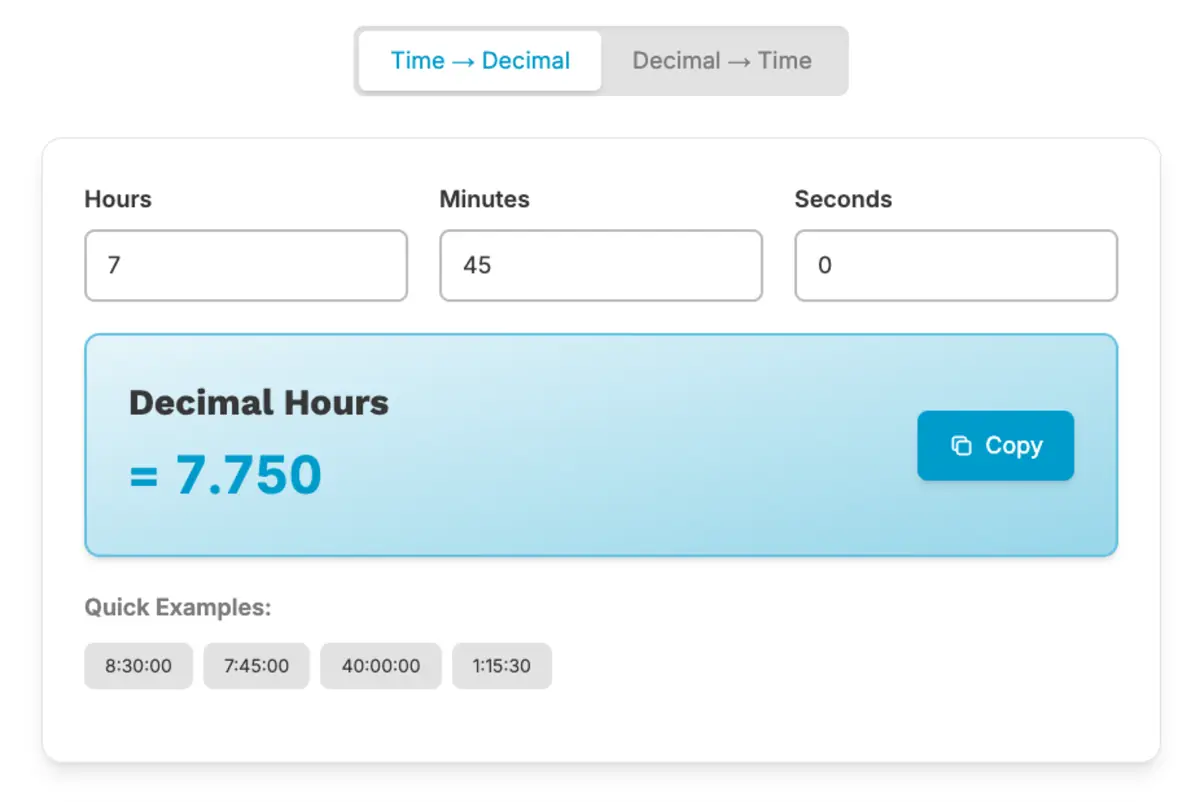
Here’s how that looks:
- 1 hour 30 minutes becomes 1.50 hours
- 1 hour 15 minutes becomes 1.25 hours
- 1 hour 45 minutes becomes 1.75 hours
The actual time worked doesn’t change. You’re just showing the minutes as part of a base-10 number instead of a 60-minute clock.
Here’s a quick visual explanation of how hours and minutes become a decimal fraction so you can see the concept in motion.
This small change makes it much easier to calculate payroll totals.
How Decimal Hours Differ from Standard Clock Time
We’re used to thinking about time in hours and minutes because that’s how clocks work. For example, a shift might run from 8:00 AM to 4:30 PM, and that feels normal to us.
The thing is, hours and minutes are based on 60, while payroll calculations are based on 10. That’s where decimal hours come in.
Standard time splits an hour into 60 parts, while decimal time splits it into 100 parts. The amount of time worked doesn’t change, just the way it’s written.
| Time Worked | Standard Clock Format | Decimal Hour Format |
|---|---|---|
| One hour and fifteen minutes | 1:15 | 1.25 |
| One hour and thirty minutes | 1:30 | 1.50 |
| One hour and forty-five minutes | 1:45 | 1.75 |
Clock time works great for scheduling and daily routines, but decimal time is designed for easier calculations.
If you want a more detailed comparison of these two formats, check out Time Clock Decimal vs Standard Time Explained.
Why Payroll Uses Decimal Hours Instead of Clock Time

Payroll is all about adding, multiplying, and calculating totals. When you’re figuring out wages, you’re multiplying hours worked by an hourly rate, and that’s much easier to do in base 10.
For example, if you’re trying to multiply 7 hours 45 minutes by $20 per hour in clock time, you’d first have to convert those 45 minutes into a fraction of an hour. Decimal time takes care of that conversion right from the start.
Once the time is in decimal form, the math is simple. You can add 7.50 + 8.25 + 6.75 without worrying about converting minutes into hours. There’s no need to think about 30 minutes as half an hour or 45 minutes as three-quarters.
Using decimals also keeps everything consistent. Every time entry follows the same format, which makes reports easier to review and compare.
That’s why payroll uses decimal hours. It simplifies the math and eliminates unnecessary steps.
If you’d like to see a step-by-step guide on converting minutes into decimals, check out How to Convert Time Cards Into Decimal Hours.
A Simple Example: Adding Time in Both Formats
Imagine an employee works three shifts in a week:
- 7 hours 30 minutes
- 8 hours 15 minutes
- 6 hours 45 minutes
If you’re adding that up in standard clock time, you’d need to handle the hours and minutes separately.
First, add the minutes: 30 + 15 + 45 equals 90 minutes. That’s 1 hour and 30 minutes. Then, you’d add that extra hour to the total hours worked.
Now let’s look at the same shifts in decimal form:
- 7.50 hours
- 8.25 hours
- 6.75 hours
You can add those numbers directly:
7.50 + 8.25 + 6.75 = 22.50 hours
No need to separate minutes or convert anything back into hours. It’s just straightforward addition.
That’s the beauty of decimal hours. They simplify payroll math by cutting out the extra steps.
A Quick Clarification About Decimal Values

A common mistake is thinking decimal hours work the same way minutes do.
For instance, someone might see 7.50 hours and assume the .50 means 50 minutes. It doesn’t.
The decimal part represents a fraction of an hour, not a count of minutes. Here’s how it breaks down:
- .50 is half an hour, or 30 minutes
- .25 is a quarter of an hour, or 15 minutes
- .75 is three-quarters of an hour, or 45 minutes
The number after the decimal isn’t based on 60. It’s based on 100. That’s why .30 means 30 percent of an hour, not 30 minutes.
If you want to learn more about common conversion mistakes and how to avoid them, check out Common Decimal Time Conversion Mistakes to Avoid.
Where You’ll See Decimal Hours in Payroll

You’ll find decimal hours anywhere payroll calculations happen.
They’re commonly used in payroll summaries, exported time reports, accounting records, and year-end wage documents. Once time is converted into decimal format for payroll, it usually stays that way throughout the entire process.
This consistency makes the math easier from start to finish. The same format is used to total hours, calculate wages, and review reports.
It might look different from how employees think about their shifts, but behind the scenes, decimal hours keep everything organized and simple to verify.
Frequently Asked Questions
Here are a few common questions business owners have when they first encounter decimal hours in payroll reports.
What are decimal hours in payroll?
Decimal hours are a base-10 way of expressing time worked. Instead of writing hours and minutes separately, payroll converts the minutes into a fraction of one full hour so the total can be calculated more easily.
Why doesn’t payroll just use regular clock time?
Clock time is based on 60 minutes per hour, which makes calculations more complicated. Payroll uses decimal hours because multiplying and totaling base-10 numbers is faster and more consistent.
Is .50 the same as 50 minutes?
No. In decimal format, .50 means half of one hour, which equals 30 minutes. The decimal represents a portion of 100, not a count out of 60.
Do decimal hours change how much someone gets paid?
No. Decimal hours don’t change the time worked. They simply express that time in a format that payroll systems can calculate more easily.
Where do decimal hours usually appear?
You’ll typically see decimal hours in payroll summaries, wage calculations, exported reports, and accounting records where total hours need to be multiplied by pay rates.
Final Thoughts
Decimal hours are easy to understand once you see how they work. They don’t change the amount of time worked, they just present it in a way that’s better for payroll math.
Instead of dealing with hours and 60-minute conversions, payroll systems use base 10 so totals can be added, multiplied, and reviewed without extra steps. It’s a simple formatting choice that makes calculations smoother.
If you’d like to see a step-by-step guide on converting minutes into decimal form, check out How to Convert Time Cards Into Decimal Hours.
Not using TimeClick yet? Try our time clock software free. 10-minute setup, unlimited users, and built for small businesses. No credit card required.
Start your FREE TimeClick Trial Today.