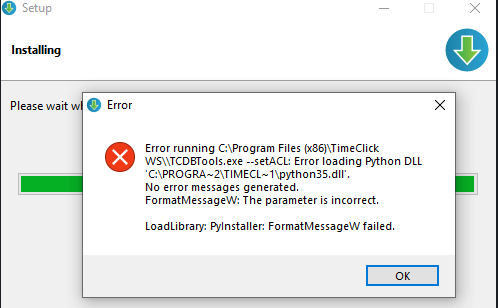
This error is commonly seen on TimeClick2021.1.1.3 but may occur on other versions as well. The fix is pretty straightforward and is the same whether it’s on the server or workstation.
-
- Ok the error message and finish the installation
-
- Once the installer is done, uninstall TimeClick2021 (I recommend making a copy of their database before uninstalling just to be extra safe)
-
- Download and install the file at the following link https://www.microsoft.com/en-us/download/confirmation.aspx?id=48145
- Reinstall TimeClick2021 as normal

Ready to streamline your employee time tracking, boost productivity, and simplify payroll? Sign up for your FREE 14-day trial today and see how TimeClick can transform your business!
Start your FREE TimeClick Trial Today.