How can we help?
Welcome to the TimeClick Support Center. Whether you’re installing for the first time, setting up new features, or fixing an issue, you’ll find step-by-step guides and answers here. Our goal is to make sure you never feel stuck and always know exactly what to do next.
Top Support Articles
These guides cover the questions we hear most often from our customers. Chances are, the answer you need is right here.
-
Upgrade to TimeClick 25
Est time: ~8 min
How to upgrade to the latest version of TimeClick
-
Move TimeClick Server
Est time: ~5 min
Step-by-step guide for transferring TimeClick to a new computer
-
Add/Move TimeClick Workstation
Est time: ~3 min
How to move your workstation from one computer to another
-
Fix Version Mismatch
Est time: ~2 min
Update your server and all workstations so versions match
-
Change Admin Password
Est time: ~1 min
How to reset or update your main admin login
-
Fix License Count Exceeded
Est time: ~2 min
Free up device slots by removing unused devices
-
TimeClick Asking for IP Address
Est time: ~2-10 min
What it means and how to fix it quickly
-
Fix Error 912
Est time: ~5 min
Caused by moving the server without transfer steps – here’s the fix
-
Update Contact Info
Est time: ~1 min
Update billing, company, or contact details with our team
-
What’s TimeClick Unlimited
Est time: ~6 min
Overview of TimeClick Unlimited support options & membership benefits.








Starter Guides
New to TimeClick? These quick-start guides will have you up and running in 10 minutes or less.
-
Install TimeClick
Est time: ~2 min
Install the server and connect workstations
-
Setup in 5 Minutes
Est time: ~5 min
Create employees, clock in/out, and run your first report
-
Master in 10 Minutes
Est time: ~10 min
Departments, jobs, PTO, permissions, schedule, reports, and more
-
TimeClick Mobile
Est time: ~4 min
Set up mobile access and learn how geo tools work
-
Upgrade to New Version
Est time: ~4 min
Switch from an older version to the latest release of TimeClick
-
TimeClick Manual
Est time: ~10 min
Full documentation and feature reference





Learn TimeClick by Module
Not sure where to start? Break it down by module. Whether it’s setting up employees, running reports, or customizing settings, these guides give you a clear overview and practical steps for each area of the software.
-
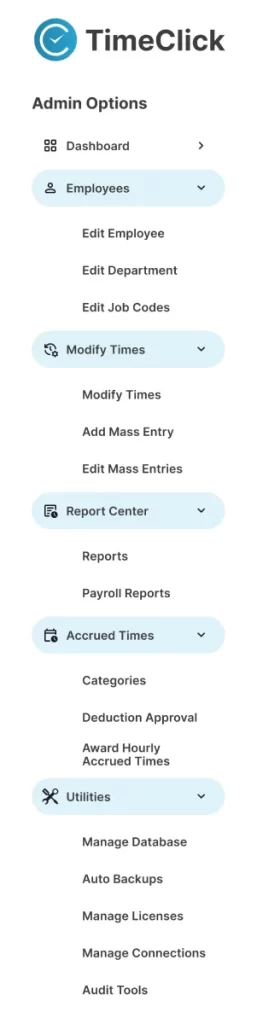
1. Main Screen Overview
Est time: ~3 min
Clock in/out, search employees, access admin tools, use help bar, view messages, & check update alerts.
-
2. Admin → Dashboard
Est time: ~4 min
Message staff, track overtime, monitor punctuality, review attendance, & view payroll insights.
-
3. Admin → Employees
Est time: ~5 min
Add/edit employees, manage departments/jobs, set schedules, pay, permissions, & restricted admins.
-
4. Admin → Modify Times
Est time: ~6 min
Edit/add time entries, fix errors, manage mass entries, handle overnight shifts, & track audit history.
-
5. Admin → Report Center
Est time: ~5 min
Generate hours/payroll reports, filter data, export to payroll, save templates, & customize report settings.
-
6. Admin → Accrued Times
Est time: ~6 min
Set PTO balances, define accrual rules, approve requests, manage departments & custom time types.
-
7. Admin → Utilities
Est time: ~5 min
Manage backups, licenses, server connections, auto backups, database moves, & audit tools for system security.
-
8. Admin → Mobile
Est time: ~4 min
Clock in/out from phones, view PTO, submit missed punches, use geo tools, enable mobile access, & connect devices.
-
9. Admin → Settings
Est time: ~5 min
Adjust company info, display settings, pay periods, overtime, mobile setup, default modules, & custom time types.
-
10. Restricted Admin
Est time: ~4 min
Grant limited admin rights, set permissions, restrict by team, manage daily tasks, & maintain system security.
-
11. Employee Options
Est time: ~4 min
Clock in/out, submit missed or PTO requests, message admins, view reports, check PTO balances, & update passwords.
-
12. Finale (coming soon)
Est time: ~3 min
TimeClick Unlimited, renewals, & long-term support – how to stay current, get help, and prepare for future TimeClick updates.








In Depth Feature Guides
Detailed walkthroughs for advanced features and custom setups. From scheduling midnight shifts to auditing time changes – these guides help you master TimeClick at a deeper level.
FAQ Center
Don’t want to read through full guides? Here you’ll find quick answers to some of the most common questions from our customers. Select a category and then scroll down to see the most helpful ones on that topic.
Plans & Pricing
Clear pricing, how billing works, refunds, and on-premise setup.
How much does the TimeClick software cost?
Pricing depends on how many devices you install it on. See the pricing page for tiers and details.
Is the price an annual or one-time fee?
TimeClick is sold for a one-time license fee. Your purchase also includes our TimeClick Unlimited plan for the first year, which you can choose to renew. If you decide not to renew, you can still get help through a per-incident support option. See our pricing for details.
What is TimeClick Unlimited?
TimeClick Unlimited is our support and upgrade membership. It gives you unlimited help from our support team, free version upgrades, and access to the mobile app. Your first year is included with your license, and you can choose to renew it after that.
Is the TimeClick mobile app included in my plan?
The mobile app is part of the TimeClick Unlimited plan, not the one-time license. To use it, you’ll need to keep your TimeClick Unlimited plan active. With it, your team can clock in and out from their phones.
Are geofencing and other geo features included in my plan?
Geo features (like geofencing and GPS rules ) are a separate add-on, regardless of membership. They require the mobile app but are purchased apart from both the one-time license and TimeClick Unlimited.
Does TimeClick run as a SaaS (software as a service)?
No. TimeClick is a server/client application that runs locally on your network. This means your data stays private and secure, without being stored in the cloud.
Are there any monthly fees for the software?
Nope. TimeClick itself is a one-time purchase – there are no monthly fees. The only recurring costs are yearly, and they apply only if you choose them:
TimeClick Unlimited plan – renewed yearly for upgrades, support, and access to the mobile app.
Geo features – an additional yearly add-on that requires Unlimited, since it runs through the mobile app.
What is your return policy?
If TimeClick isn’t the right fit for your business, our support team will walk you through the return process and make sure you’re taken care of. You can reach us by calling (435) 753-4102, emailing support@timeclick.com, or starting a live chat using the icon in the bottom right corner of your screen.

Still Need Help?
Still stuck? Our support team is here for you. Live chat responses average just 10 seconds, and phone calls are usually answered within 30 seconds. If we miss your call, just leave a voicemail or email us – we’ll get back to you within 1 business day.
With a 4.7-star support rating from 349 customers, our service speaks for itself.
Phone: (435) 753-4102 ext. 2
Email: support@timeclick.com
Live Chat: Click on icon in bottom right-hand corner
