
Don’t know how to check to see what your license size is? Keep forgetting your version number? Well, with TimeClick 21 it’s much easier than before! With our new Account Management section, you can find out with just a click of your mouse!
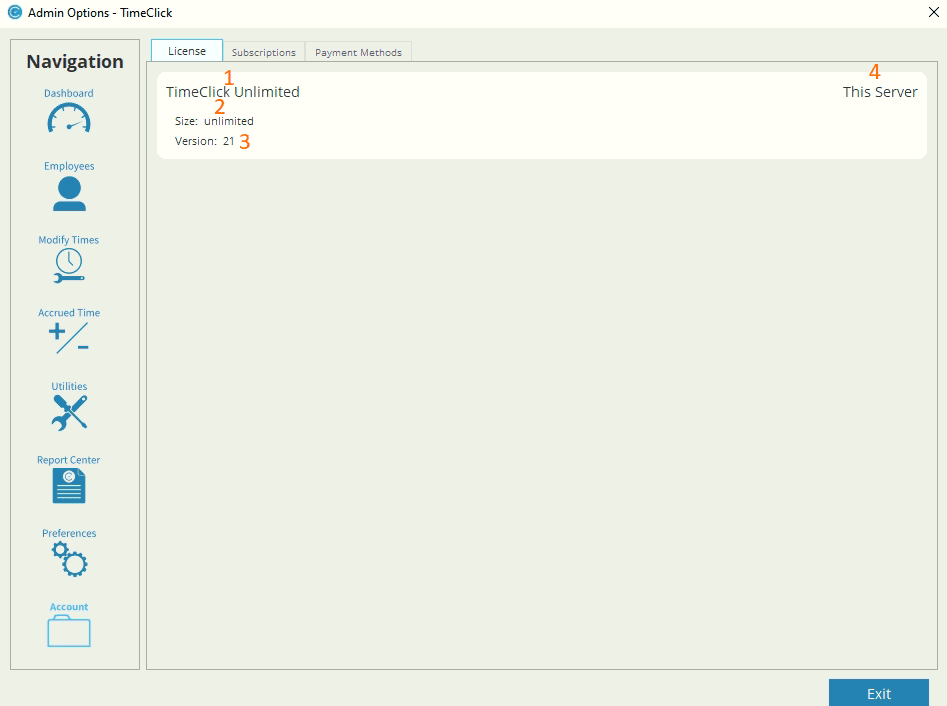
Once you’re in Admin, just click once on the Account tab. BOOM! That’s it!
Here you’ll see four things:
- Subscription Type (If you have one)
- The network license size that you own
- The current version of TimeClick that you’re using
- If you’re currently on the Server or Client/Workstation
To find out how to manage your subscription click here.
Ready to streamline your employee time tracking, boost productivity, and simplify payroll? Sign up for your FREE 14-day trial today and see how TimeClick can transform your business!
Start your FREE TimeClick Trial Today.