
With TimeClick 21 you can now manage your subscription without having to contact us. Feel free to check out the details anytime! Need to change or update your payment method? No problem!
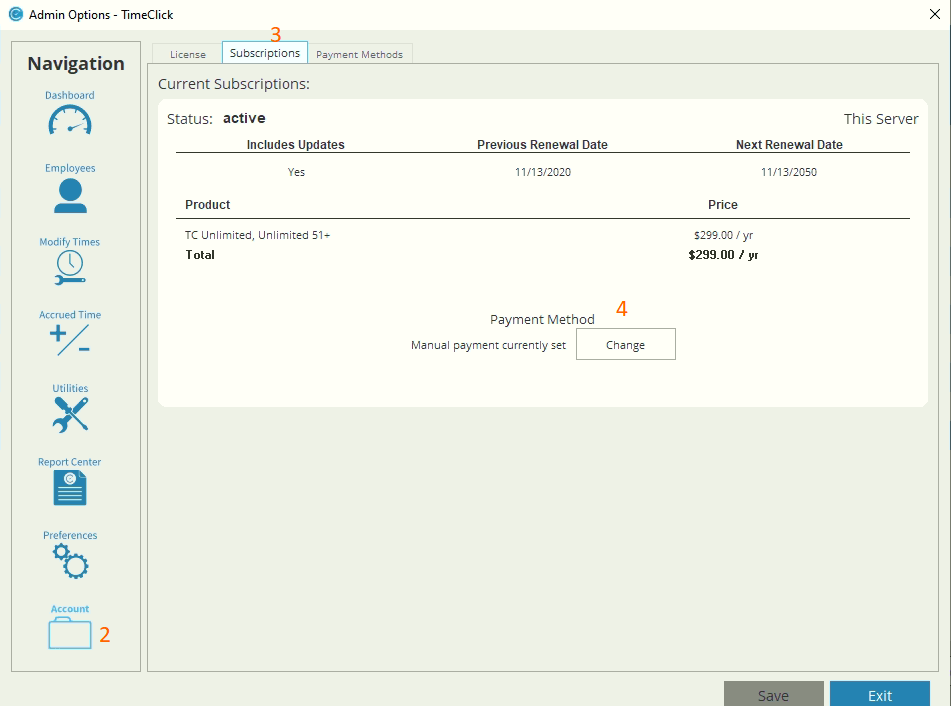
Here you can find how much you’re paying, and when it’s due. Not sure if you’re account is active? Well, you can check that here as well.
Here’s how you can update your payment method:
- Click Admin
- On the left hand side of the navigational column select Account
- Select the second tab labeled Subscriptions
- Select the Change button
- Update your info!
Ready to streamline your employee time tracking, boost productivity, and simplify payroll? Sign up for your FREE 14-day trial today and see how TimeClick can transform your business!
Start your FREE TimeClick Trial Today.